
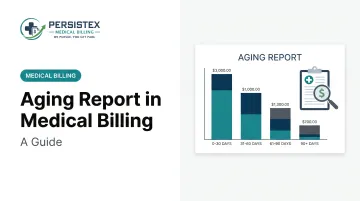
This guide is written for practice owners, billing staff, and revenue cycle managers who need more than a textbook explanation. Aging reports directly affect cash flow, expose denial patterns before they spiral, and factor into financial compliance reviews. Get the review process wrong, and revenue quietly evaporates.
The trouble is, aging reports get mentioned constantly in billing conversations, yet few teams understand how they actually function day to day. Some practices generate the report and never open it again. Others confuse it with a single AR Days average and lose the detail that matters most.
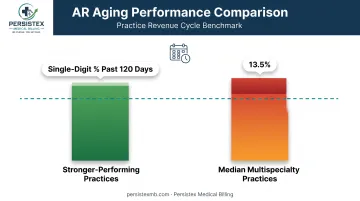
Among multispecialty practices, the median share of total AR sitting past 120 days runs above 13%, according to MGMA's 2021 practice data. This article breaks down what the report is, how it works, what affects it, and how often you should be reviewing it.
Key Takeaways
- Aging reports sort unpaid claims into time buckets (0-30, 31-60, 61-90, 90+ days), not one average like AR Days.
- Track Insurance AR and Patient AR separately—deductible balances behave differently than payer claims.
- The 90+ bucket carries the highest collection risk and the tightest timely filing windows.
- Daily or weekly AR review catches problems before they become write-offs.
- Aging data only pays off when paired with active, documented follow-up.
What Is an Aging Report in Medical Billing?
An aging report is a snapshot of every outstanding insurance claim and patient balance, organized by how many days have passed since the date of service or claim submission. Instead of one number, it shows a full distribution across time.
It gives billing teams a prioritized view of where to focus collection effort, rather than treating every unpaid balance the same way.
It's easy to confuse an aging report with total AR or AR Days. They're related but not interchangeable:
- Total AR is the dollar amount currently owed to the practice, insurance and patient combined.
- AR Days is a single average, calculated by dividing net AR by average daily revenue. It's useful for tracking trend, but it hides where the risk actually sits.
- Aging report breaks that same AR into buckets—so a healthy 35-day AR average can still hide a dangerous pile-up in the 90+ column.
Two Types of Aging Reports in Medical Billing
Most practices need two separate aging views, not one combined report.
Insurance AR aging tracks what Medicare, Medicaid, and commercial payers owe on submitted claims. This is where denial patterns, missing authorizations, and payer-specific delays show up first.
Patient AR aging tracks copays, deductibles, coinsurance, and self-pay balances owed directly by patients. This bucket has grown because patients now carry more of the cost.
The average deductible across all covered workers climbed 58% higher in 2024 than it was a decade earlier, according to KFF's 2024 Employer Health Benefits Survey. More than a quarter of covered workers are now enrolled in a high-deductible plan with a savings option.
Practices that lump patient and insurance balances into one aging view lose the ability to see which side of the ledger needs attention. A claim stuck at insurance for 45 days needs a different response than a patient statement stuck at 45 days.
Understanding Aging Buckets
Standard aging reports split outstanding balances into four or five buckets:
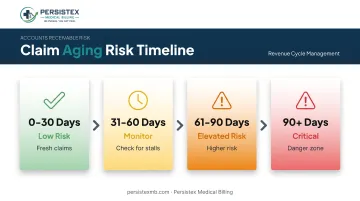
- 0-30 days: Fresh claims and balances, still within normal processing time.
- 31-60 days: Claims that should have a status update; time to check for stalls.
- 61-90 days: Higher risk. If a claim sits here untouched, something already went wrong.
- 90+ days: The danger zone, where collection odds drop and write-off risk climbs fast.
Timely filing limits make this more pressing than it looks. Medicare gives providers 12 months from the date of service, but Medicaid and commercial payers run much tighter windows: MassHealth requires an initial claim within 90 days, and commercial plans typically allow 90 to 180 days.
Miss the window, and the claim isn't just aged—it's dead. That's why claims approaching the 90+ bucket need the fastest action, not the slowest.
Why Aging Reports Matter in Medical Billing
Aging reports exist to answer one practical question: where is the money, and how fast is it slipping away?
Billing operations rely on this visibility for a few concrete reasons:
- Forecast cash flow by separating claims likely to convert this month from those still stuck
- Spot denial patterns when a payer keeps landing in the 61–90 bucket—usually a systemic issue, not one-off mistakes
- Direct AR specialists to the oldest, highest-value accounts instead of spreading effort evenly
- Replace ad hoc checking with a documented, repeatable review process
Without regular review, the pattern is predictable. Claims sit untouched, denials go unworked, and balances drift into buckets where recovery becomes far less likely.
MGMA's own polling found that 60% of medical group leaders reported higher denial rates in 2024 than the year before, per MGMA's 2024 denial management data. Every unresolved denial pushes a balance further into an older, harder-to-collect bucket.
There's no single universal benchmark for a "safe" 90+ percentage, and practices should be skeptical of anyone claiming otherwise.
What the data does show: stronger-performing practices keep most AR under 30 days and hold 120+ balances in the single digits, while median multispecialty practices sit closer to 13.5% past 120 days. That gap is the difference between collecting what you earned and slowly leaking revenue.
Consistent monitoring paired with active follow-up is what changes outcomes. At Persistex Medical Billing, aging reports aren't generated and filed away—they drive a systematic follow-up cadence at 30, 60, and 90 days on every open claim.
One behavioral health client, an eight-provider clinic, brought average AR down to 22 days and cut denials by 40% after documented follow-up replaced sporadic checking.
The report doesn't collect anything by itself. The follow-up behind it does.
How an Aging Report Works (Conceptual Flow)
An aging report isn't built manually each time. It's pulled automatically from the practice's Practice Management System or EHR, calculated from either the date of service or the date a claim was submitted, depending on which convention the system uses.
The report draws from several data sources at once: claim data, patient balances, payer information, and submission dates. Every outstanding balance gets sorted into its bucket, and high-urgency accounts (those nearing a filing deadline or already past 90 days) get flagged for immediate attention.
From there, follow-up workflow, denial management practice, and payer timeline shape what happens to each claim. As staff work each account, claims move: resolved, resubmitted, appealed, or escalated toward write-off.
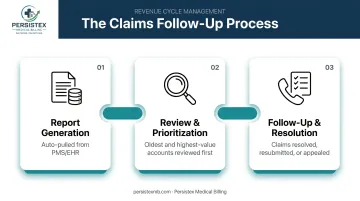
Step 1: Report Generation
Most PMS and EHR platforms auto-generate the aging report daily or weekly, depending on configuration. Every open claim and patient balance gets pulled into its bucket automatically—no manual sorting required.
This baseline data set drives everything downstream. A report full of miscoded claims or missing submission dates gives staff a distorted picture before they've even started working it.
Step 2: Review and Prioritization
Billing staff start with the oldest or highest-value accounts first, not the easiest ones. For each flagged claim, that typically means checking the payer portal for a status update and pulling the EOB or ERA to see exactly what happened: paid, denied, pending, or lost in processing.
This step is where patterns emerge. If three claims from the same payer are stuck in the same bucket with the same denial code, that's not a coincidence. That's a workflow fix waiting to happen.
Step 3: Follow-Up and Resolution
Once staff know what's happening with a claim, they act: calling the payer, contacting the patient, correcting and resubmitting the claim, or filing an appeal. Every outcome gets documented, not just resolved. That documentation protects the practice if a payer disputes the timeline later, and it builds pattern data that improves future denial prevention.
Example of an Aging Report in Medical Billing
Here's a simplified payer-level aging report for a small practice:
| Payer | 0-30 Days | 31-60 Days | 61-90 Days | 90+ Days |
|---|---|---|---|---|
| Medicare | $8,200 | $2,100 | $400 | $150 |
| Blue Cross Blue Shield | $6,500 | $3,800 | $2,900 | $3,200 |
| MassHealth | $4,100 | $1,200 | $600 | $2,700 |
| Self-Pay/Patient | $3,000 | $2,400 | $1,900 | $2,600 |
Reading this table takes seconds once you know what to look for. Medicare shows a healthy concentration: most of the balance sits in the 0-30 bucket, exactly where it should be.
Blue Cross Blue Shield and MassHealth tell a different story. Both carry more weight in the 61-90 and 90+ columns than they should, signaling a specific payer problem worth investigating.
The self-pay row deserves its own conversation. A fairly even spread across all four buckets often means patient statements aren't triggering enough follow-up calls or payment plan offers before balances go stale.
Best Practices and Common Pitfalls in Aging Report Management
A few misconceptions cause more damage than the aging report itself ever could.
Myth: aging reports are only for insurance claims. Patient balances belong in the same discipline. Ignore self-pay aging, and high-deductible plan balances become the biggest chunk of uncollected revenue.
Myth: aging report and AR Days are the same thing. AR Days is one average number; the aging report is the full distribution behind that average. Confusing the two means missing exactly where problems concentrate.
Review cadence that actually works:
- AR specialists: daily or weekly, working active follow-up on flagged accounts.
- Billing managers: weekly, prioritizing 60+ day buckets and denial trends.
- Administrators: monthly, for strategic and financial oversight.
A few dependencies determine whether the report can even be trusted:
- PMS/EHR integration quality: bad data in means a distorted report out.
- Automated alerts: flagging accounts nearing filing deadlines before it's too late.
- Clearinghouse claim scrubbing: catching errors before submission, not after denial.
An aging report by itself is just data. Without a documented follow-up process attached to it, it's a spreadsheet nobody acts on.
The clearest warning sign of underuse is reviewing it only once a month despite high claim volume, or letting the 90+ bucket pile up until it becomes an emergency.
Conclusion
An aging report categorizes every outstanding claim and patient balance by how long it's been unpaid, giving billing teams a clear map of where collection risk sits. Understanding the bucket structure, and knowing where your practice stands against benchmarks like MGMA's 13.5% median past 120 days, matters directly for cash flow and financial stability.
The report itself won't collect a single dollar. Consistent review paired with active, documented follow-up does that work. That is the model Persistex Medical Billing runs for the practices it serves: turning aging data into collected revenue instead of a report that sits unused.
Frequently Asked Questions
What is aging in medical billing?
Aging refers to tracking how long an insurance claim or patient balance has remained unpaid, measured from the date of service or claim submission. Billing systems group these balances into day-based buckets, like 0-30 or 90+ days, to show where collection risk is highest.
What are the two types of aging reports?
Insurance AR aging tracks claims owed by Medicare, Medicaid, and commercial payers. Patient AR aging tracks copays, deductibles, coinsurance, and self-pay balances, a category that's increased as high-deductible health plans have become more common.
Can you provide an example of an aging report in medical billing?
A typical aging report lists payers or patient balances down one side and time buckets (0-30, 31-60, 61-90, 90+ days) across the top, with dollar amounts in each cell, similar to the sample table earlier in this guide.
How often should I run an aging report in medical billing?
AR specialists should review it daily or weekly to keep active follow-up moving on flagged accounts. Administrators typically review it monthly for broader financial and strategic oversight.
What is considered a healthy AR aging percentage?
There's no single universal number, but stronger-performing practices keep the large majority of AR in the 0-30 day bucket and hold balances past 120 days in the single digits. Median multispecialty practices sit closer to 13.5% past 120 days.
What causes claims to age past 90 days?
The most common causes are unworked denials, missing prior authorizations, coding or documentation errors, and insufficient follow-up staffing. Each unaddressed denial pushes the balance further into an older, harder-to-collect bucket.